Writing a Binary Search Tree in Python with Examples

Last published October 1, 2022
What is a binary search tree?
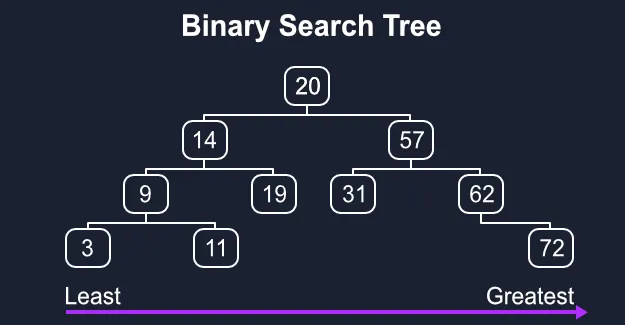
A binary search tree, or BST for short, is a tree where each node is a value greater than all of its left child nodes and less than all of its right child nodes. Read on for an implementation of a binary search tree in Python from scratch!
Subscribe to my YouTube channel if this video was helpful!
Also, if you’re interested in really learning this stuff, you should check out three of my courses:
Why would I use a binary search tree?
Binary trees are useful for storing data in an organized manner so that it can be quickly retrieved, inserted, updated, and deleted. This arrangement of nodes allows each comparison to skip about half of the rest of the tree, so each operation as a whole is lightning fast.
To be precise, binary search trees provide an average Big-O complexity of O(log(n)) for search, insert, update, and delete operations. log(n) is much faster than the linear O(n) time required to find elements in an unsorted array. Many popular production databases such as PostgreSQL and MySQL use binary trees under the hood to speed up CRUD operations.
Pros of a BST
- When balanced, a BST provides lightning-fast
O(log(n))insertions, deletions, and lookups. - Binary search trees are simple to implement. An ordinary BST, unlike a balanced red-black tree, requires very little code to get running.
Cons of a BST
- Slow for a brute-force search. If you need to iterate over each node, you might have more success with an array.
- When the tree becomes unbalanced, all fast
O(log(n))operations quickly degrade toO(n). - Since pointers to whole objects are typically involved, a BST can require quite a bit more memory than an array, although this depends on the implementation.
Implementing a B-tree in Python
Step 1 - BSTNode Class
Our implementation won’t use a Tree class, but instead just a Node class. Binary trees are really just a pointer to a root node that in turn connects to each child node, so we’ll run with that idea.
First, we create a constructor:
class BSTNode:
    def __init__(self, val=None):
        self.left = None
        self.right = None
        self.val = val
We’ll allow a value, which will also act as the key, to be provided. If one isn’t provided we’ll just set it to None. We’ll also initialize both children of the new node to None.
Step 2 - Insert

We need a way to insert new data into the tree. Inserting a new node should append it as a leaf node in the proper spot.
  10                                10
 /   \        Insert 5            /    \
 2    60    --------->           2     60
/  \                            /  \
1   3                           1   3
                                     \
                                      5
The insert method is as follows:
def insert(self, val):
    if not self.val:
        self.val = val
        return

    if self.val == val:
        return

    if val < self.val:
        if self.left:
            self.left.insert(val)
            return
        self.left = BSTNode(val)
        return

    if self.right:
        self.right.insert(val)
        return
    self.right = BSTNode(val)
If the node doesn’t yet have a value, we can just set the given value and return. If we ever try to insert a value that also exists, we can also simply return as this can be considered a “no-op”. If the given value is less than our node’s value and we already have a left child then we recursively call insert on our left child. If we don’t have a left child yet then we just make the given value our new left child. We can do the same (but inverted) for our right side.
Step 3 - Get Min and Get Max
def get_min(self):
    current = self
    while current.left is not None:
        current = current.left
    return current.val

def get_max(self):
    current = self
    while current.right is not None:
        current = current.right
    return current.val
getMin and getMax are useful helper functions, and they’re easy to write! They are simple recursive functions that traverse the edges of the tree to find the smallest or largest values stored therein.
Step 4 - Delete
def delete(self, val):
    if self == None:
        return self
    if val < self.val:
        self.left = self.left.delete(val)
        return self
    if val > self.val:
        self.right = self.right.delete(val)
        return self
    if self.right == None:
        return self.left
    if self.left == None:
        return self.right
    min_larger_node = self.right
    while min_larger_node.left:
        min_larger_node = min_larger_node.left
    self.val = min_larger_node.val
    self.right = self.right.delete(min_larger_node.val)
    return self
The delete operation is one of the more complex ones. It is a recursive function as well, but it also returns the new state of the given node after performing the delete operation. This allows a parent whose child has been deleted to properly set it’s left or right data member to None.
Step 5 - Exists
The exists function is another simple recursive function that returns True or False depending on whether a given value already exists in the tree.
def exists(self, val):
    if val == self.val:
        return True

    if val < self.val:
        if self.left == None:
            return False
        return self.left.exists(val)

    if self.right == None:
        return False
    return self.right.exists(val)
Step 6 - Inorder
It’s useful to be able to print out the tree in a readable format. The inorder method print’s the values in the tree in the order of their keys.
def inorder(self, vals):
    if self.left is not None:
        self.left.inorder(vals)
    if self.val is not None:
        vals.append(self.val)
    if self.right is not None:
        self.right.inorder(vals)
    return vals
Step 7 - Preorder
def preorder(self, vals):
    if self.val is not None:
        vals.append(self.val)
    if self.left is not None:
        self.left.preorder(vals)
    if self.right is not None:
        self.right.preorder(vals)
    return vals
Step 8 - Postorder
def postorder(self, vals):
    if self.left is not None:
        self.left.postorder(vals)
    if self.right is not None:
        self.right.postorder(vals)
    if self.val is not None:
        vals.append(self.val)
    return vals
Using the BST
def main():
    nums = [12, 6, 18, 19, 21, 11, 3, 5, 4, 24, 18]
    bst = BSTNode()
    for num in nums:
        bst.insert(num)
    print("preorder:")
    print(bst.preorder([]))
    print("#")

    print("postorder:")
    print(bst.postorder([]))
    print("#")

    print("inorder:")
    print(bst.inorder([]))
    print("#")

    nums = [2, 6, 20]
    print("deleting " + str(nums))
    for num in nums:
        bst.delete(num)
    print("#")

    print("4 exists:")
    print(bst.exists(4))
    print("2 exists:")
    print(bst.exists(2))
    print("12 exists:")
    print(bst.exists(12))
    print("18 exists:")
    print(bst.exists(18))
Full Binary Search Tree in Python
class BSTNode:
    def __init__(self, val=None):
        self.left = None
        self.right = None
        self.val = val

    def insert(self, val):
        if not self.val:
            self.val = val
            return

        if self.val == val:
            return

        if val < self.val:
            if self.left:
                self.left.insert(val)
                return
            self.left = BSTNode(val)
            return

        if self.right:
            self.right.insert(val)
            return
        self.right = BSTNode(val)

    def get_min(self):
        current = self
        while current.left is not None:
            current = current.left
        return current.val

    def get_max(self):
        current = self
        while current.right is not None:
            current = current.right
        return current.val

    def delete(self, val):
        if self == None:
            return self
        if self.right == None:
            return self.left
        if self.left == None:
            return self.right
        if val < self.val:
            if self.left:
                self.left = self.left.delete(val)
            return self
        if val > self.val:
            if self.right:
                self.right = self.right.delete(val)
            return self
        min_larger_node = self.right
        while min_larger_node.left:
            min_larger_node = min_larger_node.left
        self.val = min_larger_node.val
        self.right = self.right.delete(min_larger_node.val)
        return self

    def exists(self, val):
        if val == self.val:
            return True

        if val < self.val:
            if self.left == None:
                return False
            return self.left.exists(val)

        if self.right == None:
            return False
        return self.right.exists(val)

    def preorder(self, vals):
        if self.val is not None:
            vals.append(self.val)
        if self.left is not None:
            self.left.preorder(vals)
        if self.right is not None:
            self.right.preorder(vals)
        return vals

    def inorder(self, vals):
        if self.left is not None:
            self.left.inorder(vals)
        if self.val is not None:
            vals.append(self.val)
        if self.right is not None:
            self.right.inorder(vals)
        return vals

    def postorder(self, vals):
        if self.left is not None:
            self.left.postorder(vals)
        if self.right is not None:
            self.right.postorder(vals)
        if self.val is not None:
            vals.append(self.val)
        return vals
Where would you use a binary search tree in real life?
There are many applications of binary search trees in real life, and one of the most common use cases is in storing indexes and keys in a database.
For example, in MySQL or PostgreSQL when you create a primary key column, what you’re really doing is creating a binary tree where the keys are the values of the column, and those nodes point to database rows. This lets the application easily search database rows by providing a key. For example, getting a user record by the email primary key.
There are many applications of binary search trees in real life, and one of the most common use cases is storing indexes and keys in a database.
For example, when you create a primary key column in MySQL or PostgreSQL, you create a binary tree where the keys are the values of the column and the nodes point to database rows. This allows the application to easily search for database rows by specifying a key, for example, to find a user record using the email primary key.
Other common uses include:
- Pathfinding algorithms in video games (A*) use BSTs
- File compression using a Huffman encoding scheme uses a binary search tree
- Rendering calculations - Doom (1993) was famously the first game to use a BST
- Compilers for low-level coding languages parse syntax using a BST
- Almost every database in existence uses BSTs for key lookups
What’s the difference between a Binary Tree and a Linked List?
While binary trees and linked lists both use pointers to keep track of nodes, binary trees are more efficient for searching. In fact, linked lists are O(n) when used to search for a specific element - that’s pretty bad! Linked lists excel at removing and inserting elements quickly in the middle of the list.
Related Articles
Building a Linked List in Python with Examples
Jan 11, 2021 by Lane Wagner - Boot.dev co-founder and backend engineer
A linked list is a linear data structure where elements are not stored next to each other in memory. Unlike and array, elements in a linked list use pointers or references to each other to keep the list intact.
Should you Learn Computer Science or Software Engineering?
Dec 17, 2020 by Winston Wagner - Technical author at Boot.dev
The most important thing to understand about these two fields of study is that, ultimately, they are similar. At the end of the day, Software Engineering and Computer Science will both help to make you a better programmer and developer, and the only difference between the two is how they are applied. Software Engineering tends to be more practical, and Computer Science tends to be more theoretical. In a way, Software Engineering is just applied Computer Science, and using that as a starting point, we can examine the differences between the two.
Guide to Getting a Certificate in Computer Science
Dec 15, 2020 by Zulie Rane - Data analysis and computer science techincal author
There are so many reasons to want to get a certificate in computer science in 2021, especially when you compare it to alternatives like getting a degree or attending a coding bootcamp.
6 Computer Science Resume Examples
Dec 14, 2020 by Lane Wagner - Boot.dev co-founder and backend engineer
It’s really hard to get your foot in the door for engineering interviews, especially if you have no experience and are looking for an entry-level position. Often times, more experienced candidates looking to find a higher-paying job can also have trouble. As an employer myself, I can tell you that one of the biggest mistakes I see in 75% of resumes is using a visually boring template. When I’m sifting through forty or fifty applicants, it’s really easy for my eyes to glaze over. Think of your resume as your website landing page. You need to catch your employer’s attention by calling out your biggest accomplishments and selling points at a glance.